
| Components |
|---|
| Arduino board |
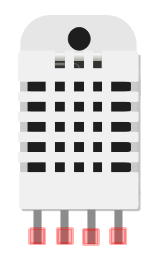
| Temperature Sensor (DHT22) |
| Resistor (10 kΩ) |
| I2C LCD |
| 2N2222 Transistor |
| DC 5V Fan Motor |
| Breadboard |
| Breadboard wire links |
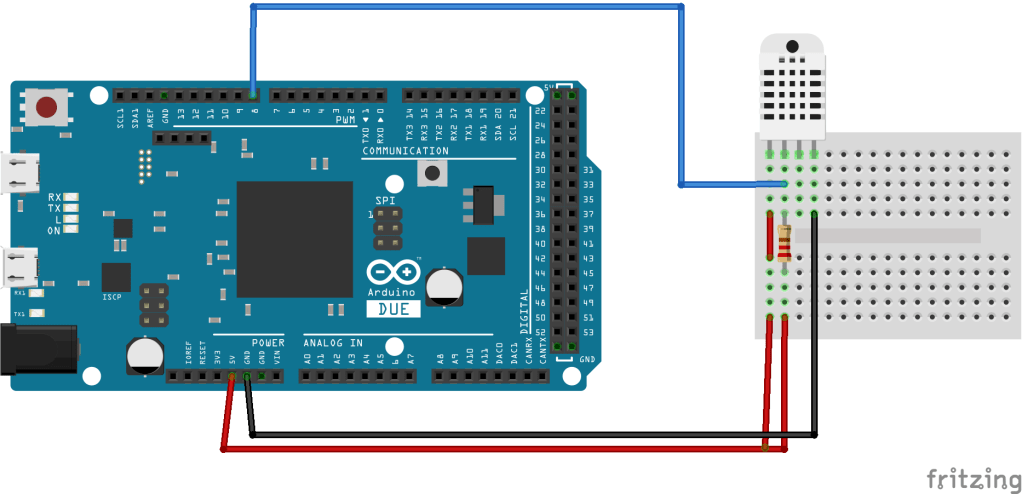
Arduino Temperature Sensor Wiring Diagram
Temperature Sensor Data Reading Code in Arduino
#include "DHT.h"
DHT dht(8, DHT22);

void setup() {
  Serial.begin(9600);
  dht.begin();
}


void loop() {
  delay(2000);

  float h = dht.readHumidity();
  float t = dht.readTemperature();
  float hic = dht.computeHeatIndex(t, h, false);

  Serial.print("Humidity: ");
  Serial.print(h);
  Serial.print(" %\t");
  Serial.print("Temperature: ");
  Serial.print(t);
  Serial.print(" *C ");
  Serial.print("Heat index: ");
  Serial.print(hic);
  Serial.println(" *C ");
}
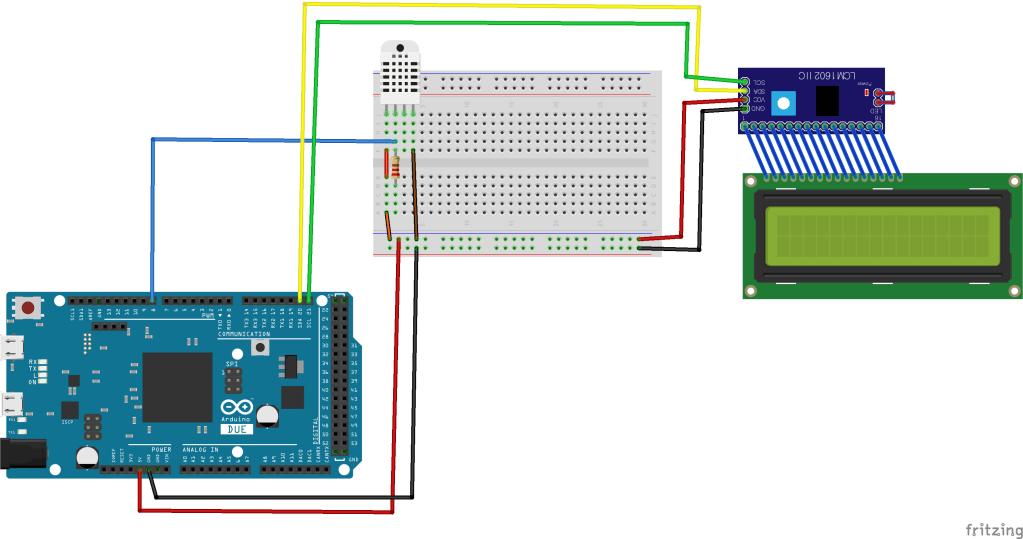
Temperature Sensor and I2C LED Wiring Diagram
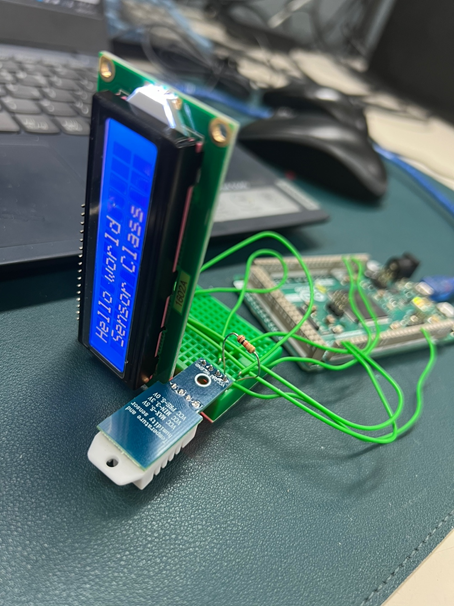
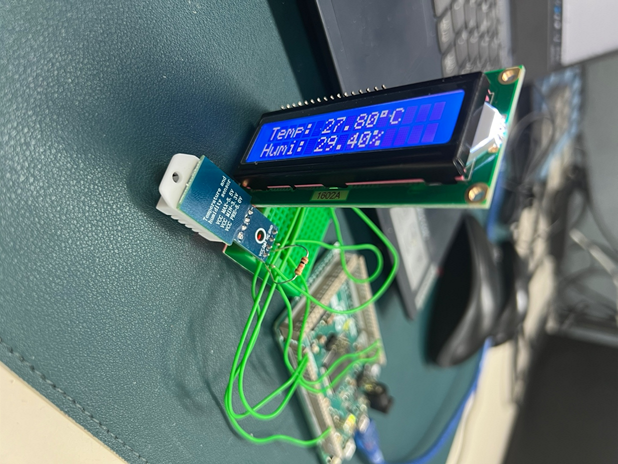
I2C LED Code in Arduino
#include <LiquidCrystal_I2C.h>

LiquidCrystal_I2C lcd(0x27,16,2); // set the LCD address to 0x3F or 0x27 for a 16 chars and 2 line display

void setup()
{
lcd.init(); // initialize the lcd
// Print a message to the LCD.
lcd.backlight();
lcd.setCursor(0,0);
lcd.print("Hello world");
lcd.setCursor(1,1);
lcd.print("Sensor Class");
}

void loop()
{

}
Temperature Sensor and I2C LED Code in Arduino
#include <LiquidCrystal_I2C.h>
#include "DHT.h"
#define DHTPIN 8
#define DHTTYPE DHT22

LiquidCrystal_I2C lcd(0x27, 16, 2);  // I2C address 0x3F, 16 column and 2 rows
DHT dht(DHTPIN, DHTTYPE);

void setup()
{
  dht.begin();     // initialize the sensor
  lcd.init();      // initialize the lcd
  lcd.backlight(); // open the backlight
}

void loop()
{
  delay(2000); // wait a few seconds between measurements

  float humi  = dht.readHumidity();    // read humidity
  float tempC = dht.readTemperature(); // read temperature

  lcd.clear();
  // check if any reads failed
  if (isnan(humi) || isnan(tempC)) {
    lcd.setCursor(0, 0);
    lcd.print("Failed");
  } else {
    lcd.setCursor(0, 0);  // start to print at the first row
    lcd.print("Temp: ");
    lcd.print(tempC);     // print the temperature
    lcd.print((char)223); // print ° character
    lcd.print("C");

    lcd.setCursor(0, 1);  // start to print at the second row
    lcd.print("Humi: ");
    lcd.print(humi);      // print the humidity
    lcd.print("%");
  }
}
Temperature-Controlled Fan Wiring Diagram

Temperature-Controlled Fan Code in Arduino
/*Introduction to Sensors and Application Class #7 */

#include "DHT.h"
#include <LiquidCrystal_I2C.h>
LiquidCrystal_I2C lcd(0x27, 16, 2);
#define DHTPIN 8     // what pin we're connected to
//#define DHTTYPE DHT11   // DHT 11
#define DHTTYPE DHT22   // DHT 22
#define pwm 9
byte degree[8] =
{
  0b00011,
  0b00011,
  0b00000,
  0b00000,
  0b00000,
  0b00000,
  0b00000,
  0b00000
};
// Initialize DHT sensor for normal 16mhz Arduino
DHT dht(DHTPIN, DHTTYPE);
void setup() {
  //lcd.begin();
  lcd.init();      // initialize the lcd
  lcd.backlight(); // open the backlight
  lcd.createChar(1, degree);
  lcd.clear();
  lcd.print("   Fan Speed  ");
  lcd.setCursor(0, 1);
  lcd.print("  Controlling ");
  delay(2000);
  analogWrite(pwm, 255);
  lcd.clear();
  lcd.print("Temp Sensor");
  lcd.setCursor(0, 1);
  lcd.print("Sensor Class");
  delay(2000);
  lcd.clear();
  Serial.begin(9600);
  dht.begin();
}
void loop() {
  // Wait a few seconds between measurements.
  delay(2000);
  // Reading temperature or humidity takes about 250 milliseconds!
  // Sensor readings may also be up to 2 seconds 'old' (its a very slow sensor)
  float h = dht.readHumidity();
  // Read temperature as Celsius
  float t = dht.readTemperature();
  // Check if any reads failed and exit early (to try again).
  if (isnan(h) || isnan(t)) {
  Serial.println("Failed to read from DHT sensor!");
    return;
  }
  Serial.print("Humidity: ");
  Serial.print(h);
  Serial.print(" %\t");
  Serial.print("temperature: ");
  Serial.print(t);
  Serial.print(" *C ");
  lcd.clear();
  lcd.setCursor(0, 0);
  lcd.print("temp: ");
  lcd.print(t);   // Printing temperature on LCD
  lcd.print(" *C");
  lcd.setCursor(0, 1);
  if (t < 27 )
{
  analogWrite(9, 0);
    lcd.print("Fan OFF            ");
    delay(100);
  }
  else if (t >= 27 && t <= 29)
{
  analogWrite(pwm, 51);
    lcd.print("Fan Speed: 20%   ");
    delay(100);
    digitalWrite(pwm, 51);
  }
  else if (t >= 29 && t <= 30)
{
  analogWrite(pwm, 102);
    lcd.print("Fan Speed: 40%   ");
    digitalWrite(pwm, 102);
    delay(100);

  }
  else if (t >= 30 && t <= 31)
{
    analogWrite(pwm, 153);
    lcd.print("Fan Speed: 60%   ");
    digitalWrite(pwm, 153);
    delay(100);
  }
 else if (t >= 31 && t <= 32)
{
    analogWrite(pwm, 204);
    lcd.print("Fan Speed: 80%    ");
    digitalWrite(pwm, 204);
    delay(100);
  }
  else if (t >= 32)
{
    analogWrite(pwm, 255);
    lcd.print("Fan Speed: 100%   ");
    digitalWrite(pwm, 255);
    delay(100);
  }
  delay(2000);
}
Students’ Work (2023.04.24)
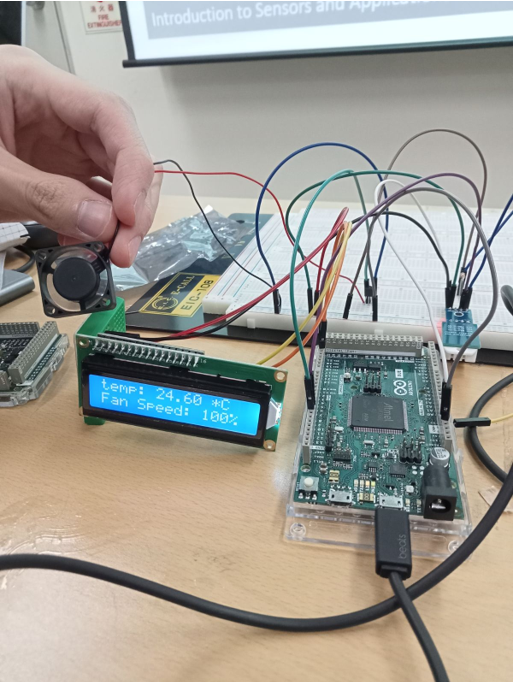
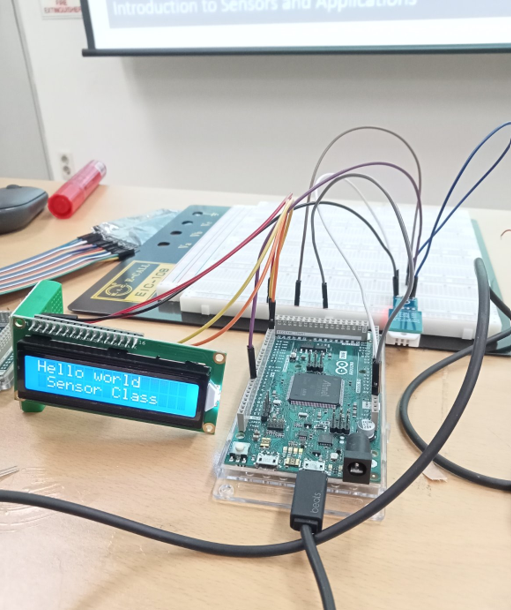
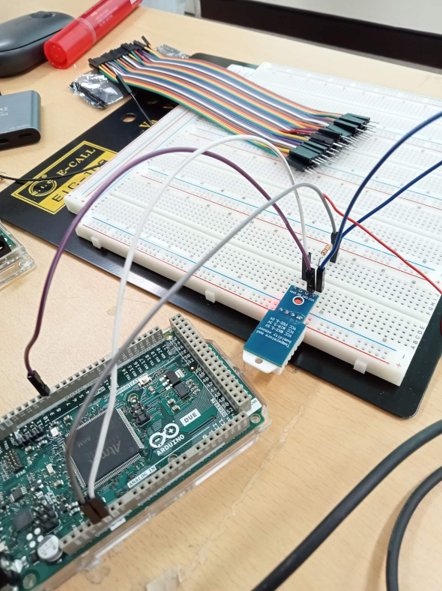


 Osman Gul
Leave a comment